Scope & Proposal · Version 3.0

A marketplace for home kitchens.

Everything agreed so far, in one place: what gets built, how each part of the product behaves, what you receive at the end, and the handful of decisions still open. Read it through, mark anything that looks wrong, and we lock the scope.

Prepared for
[Client name]
Prepared by
IT Walay
Markets
Pakistan & USA
Date
28 October 2026
3
Applications at launch — customer, kitchen, admin
3
Order types — regular, bulk and custom
69
Agreed requirements, each with an ID
15
User flows mapped end to end
01

What we are building

A two-sided marketplace for people who cook and sell from home. Anyone selling food from a home kitchen — cooked meals, baked goods, cakes, dry goods, sweets, preserves — creates a kitchen, builds a menu with prices and photos, and starts selling.

Customers find food by searching for a dish, browsing what is popular, or filtering by cuisine. Orders are collected by the customer or delivered by the kitchen itself. Both markets go live together.

The goal everything else serves. A home cook should get from downloading the app to a published listing in under thirty minutes, typing as little as possible along the way. Onboarding and menu building carry more weight in this build than any other part of the product.

Customer app

iOS and Android. Discover kitchens, order regular, bulk or custom, pay, track, report a problem.

Kitchen app

iOS and Android. Onboard, build a menu, manage stock, quote custom work, run orders, set delivery, see earnings.

Admin panel

Web. Kitchens, customers, taxonomy, subscriptions, fees, payouts, disputes, moderation and reporting.

Business model

02

The menu and order engine

This is the heart of the product, so it is worth setting out before anything else. Three order types sit on one menu engine that has to work for Pakistani, Indian, Japanese, American, Arabic, Mexican and bakery kitchens alike.

Menu structure

Cuisine → Category → Dish → Selling Option. For example:

Every level is data you manage, not a list fixed in the code. Pre-filled libraries make setup fast, a kitchen that cannot find its dish can add one, and new cuisines, categories, dishes, tags or selling options are added from the admin panel without a developer and without an app release.

The three order types

Regular / Daily

Normal food a kitchen is selling on a given day — thirty Chicken Biryani plates on Friday.

Date → item → price → quantity → cutoff → SOLD OUT. Stock falls as orders come in and the item closes itself at zero. Paid 100% online.

Bulk

Larger quantities the kitchen already offers — half tray biryani $45, full tray $80, box of twelve cupcakes $30.

Package → servings → price → lead time → future date. Ordered directly, with no quote step. Paid in full or deposit plus balance.

Custom

Something not already listed — food for fifty people at a birthday.

Request → kitchen quote → deposit → confirmed order. Paid in full or deposit plus balance.

Custom requests and quotes

The request is a structured form rather than free text, so the kitchen has what it needs to price the job without a back-and-forth.

Three things that sound alike and are not. Availability is how many units exist for a date. Lead time is the notice an item needs, like a cake wanting 48 hours. Cutoff is when ordering closes for a date, like Friday orders closing at 2:00 pm. Each is set separately, because kitchens use all three differently.
03

Scope

Core MVP

Customer app, kitchen app, admin panel and the dual-market payments layer. Launches in Pakistan and the USA with pickup and kitchen-managed delivery.

Option A — platform delivery

Driver app, dispatch, live GPS, third-party fleet integration and driver payouts. Priced separately. Commission it at kickoff, later, or not at all.

Not in this build

Customer web ordering, multi-kitchen cart, full customer–kitchen chat, advanced AI recommendations, BI and analytics, loyalty and promotions.

Delivery stays open. Even if Option A is never commissioned, the fulfilment layer is built so your own driver network or a third-party service can be added later without rebuilding the ordering system. That flexibility is an architecture requirement from day one, not an afterthought.
04

User flows

Every path through the product, including the awkward ones — the last plate selling twice, a payment failing halfway, a customer who never turns up, a complaint that arrives after the kitchen has been paid. These are drafts for the walkthrough and can change before sign-off.

Customer Kitchen Platform Admin Payment Stop / fail End Decision
Getting a kitchen live 3 flows›

Kitchen onboarding to first listing

Target: under 30 minutes from download to submission. Admin review within 24 hours.
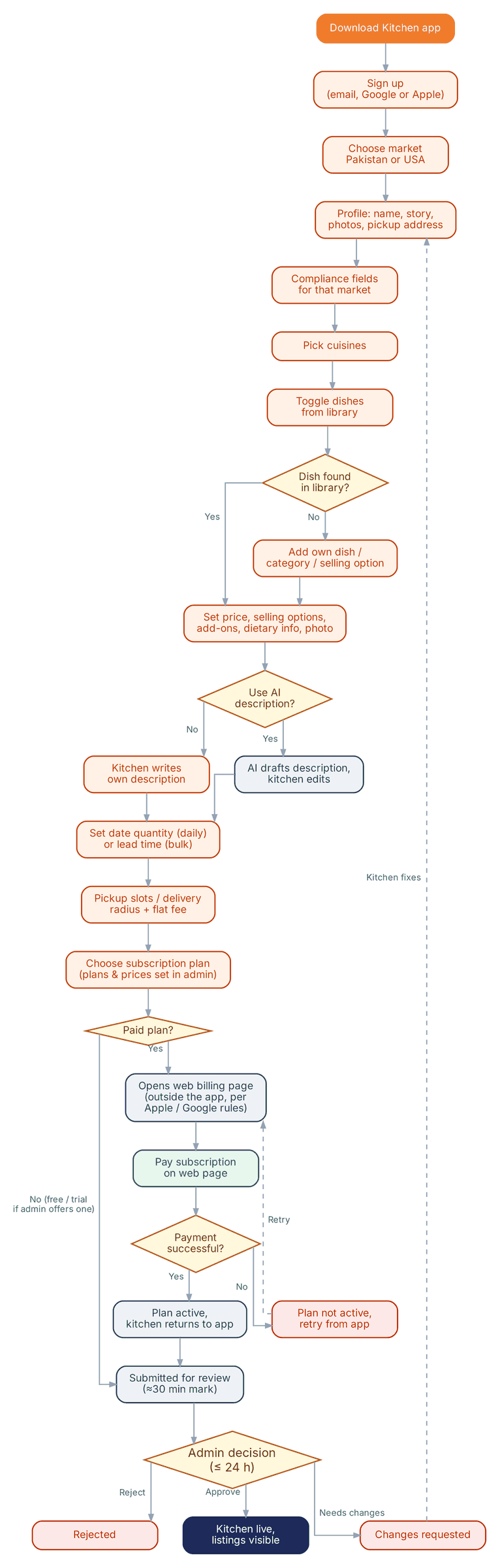
Kitchen onboarding flow
Scroll inside the panel to exploreOpen full size ↗

Kitchen subscription billing

Plans and prices configurable in admin. Billed on the web, not through in-app purchase.
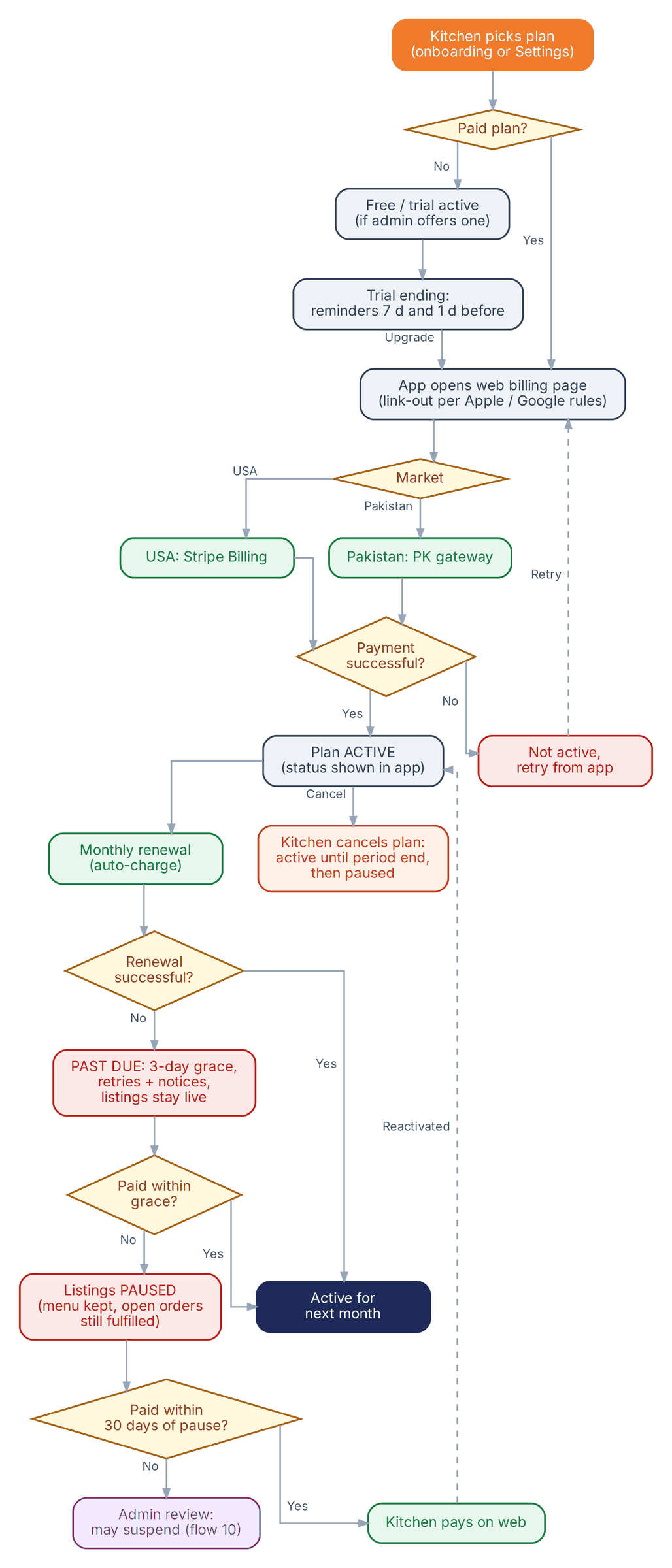
Subscription billing flow
Scroll inside the panel to exploreOpen full size ↗

Admin: kitchen approval and management

Review target within 24 hours of submission, plus suspension and removal later.
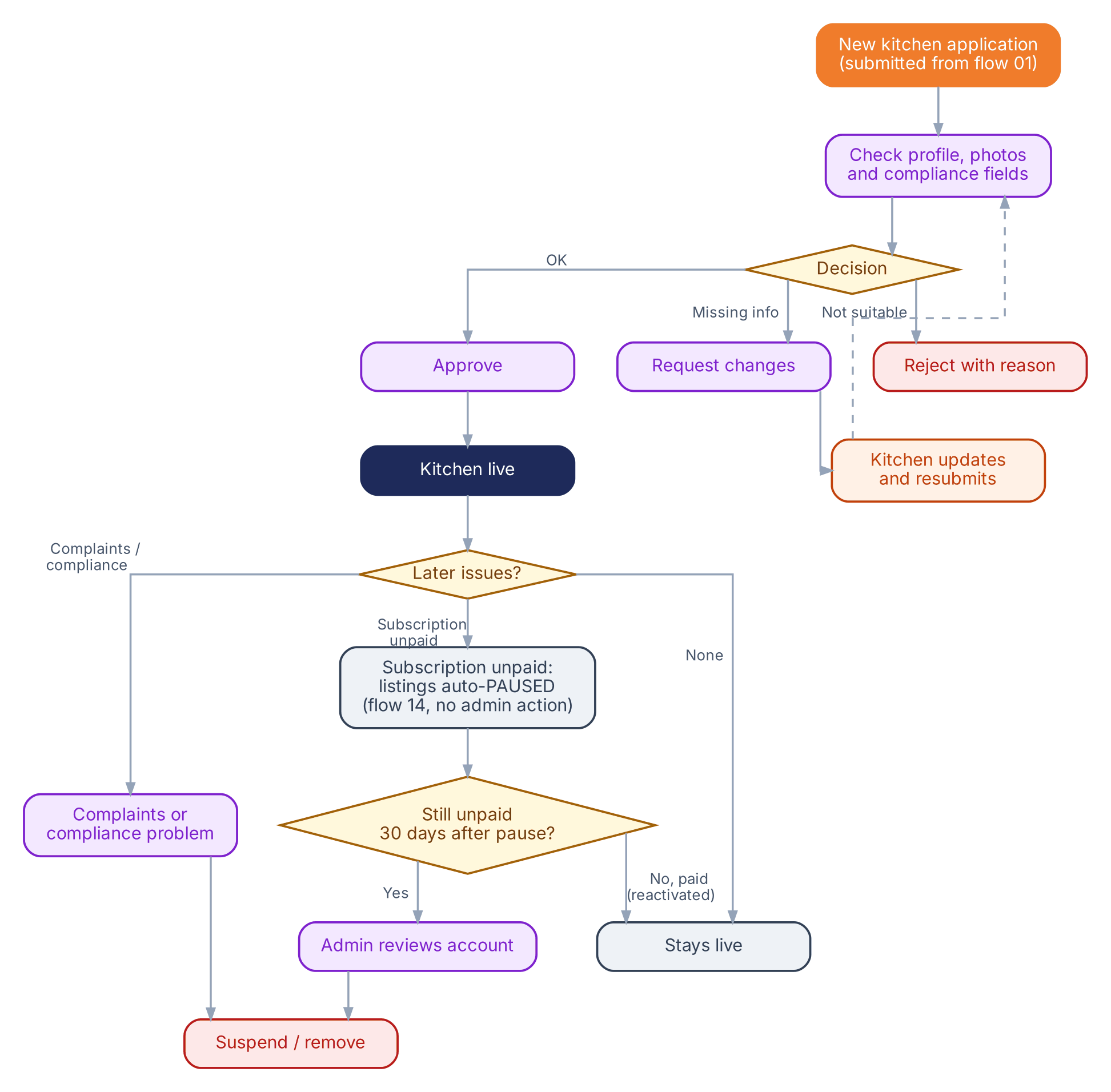
Kitchen approval flow
Scroll inside the panel to exploreOpen full size ↗
Ordering 4 flows›

Customer journey overview

How a customer reaches each of the three order types.
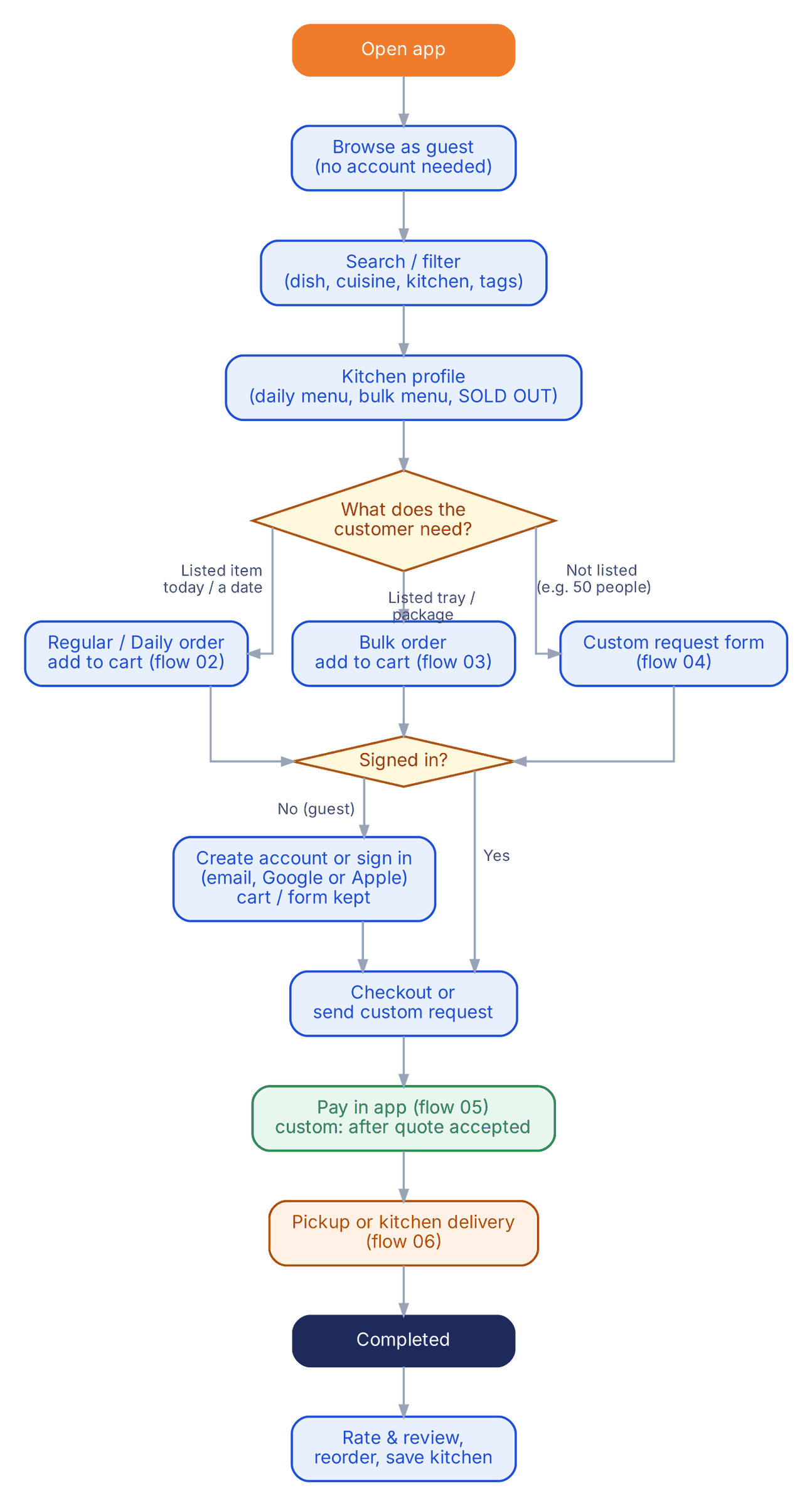
Customer journey overview
Scroll inside the panel to exploreOpen full size ↗

Regular / daily order

Worked through with 30 Chicken Biryani plates on Friday, cutoff 2 pm.
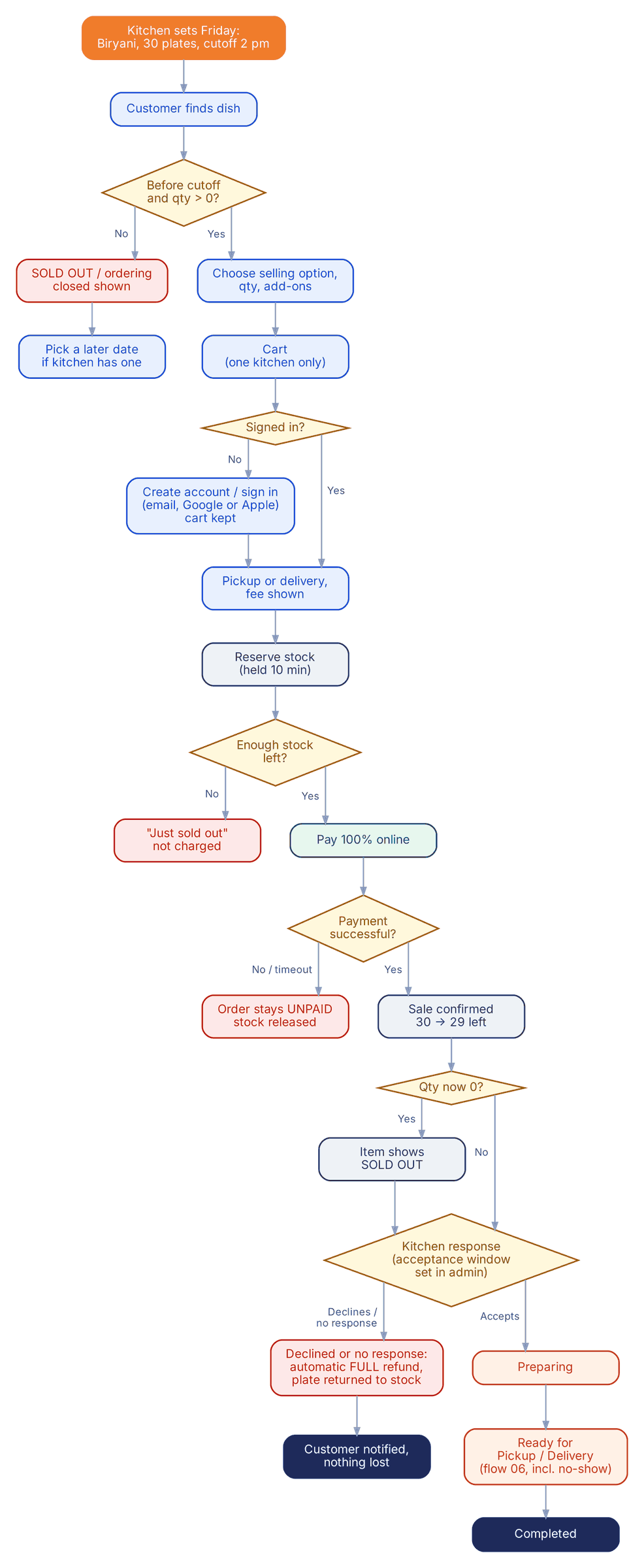
Regular daily order flow
Scroll inside the panel to exploreOpen full size ↗

Bulk order

Worked through with a full tray of biryani at $80 and a 48-hour lead time.
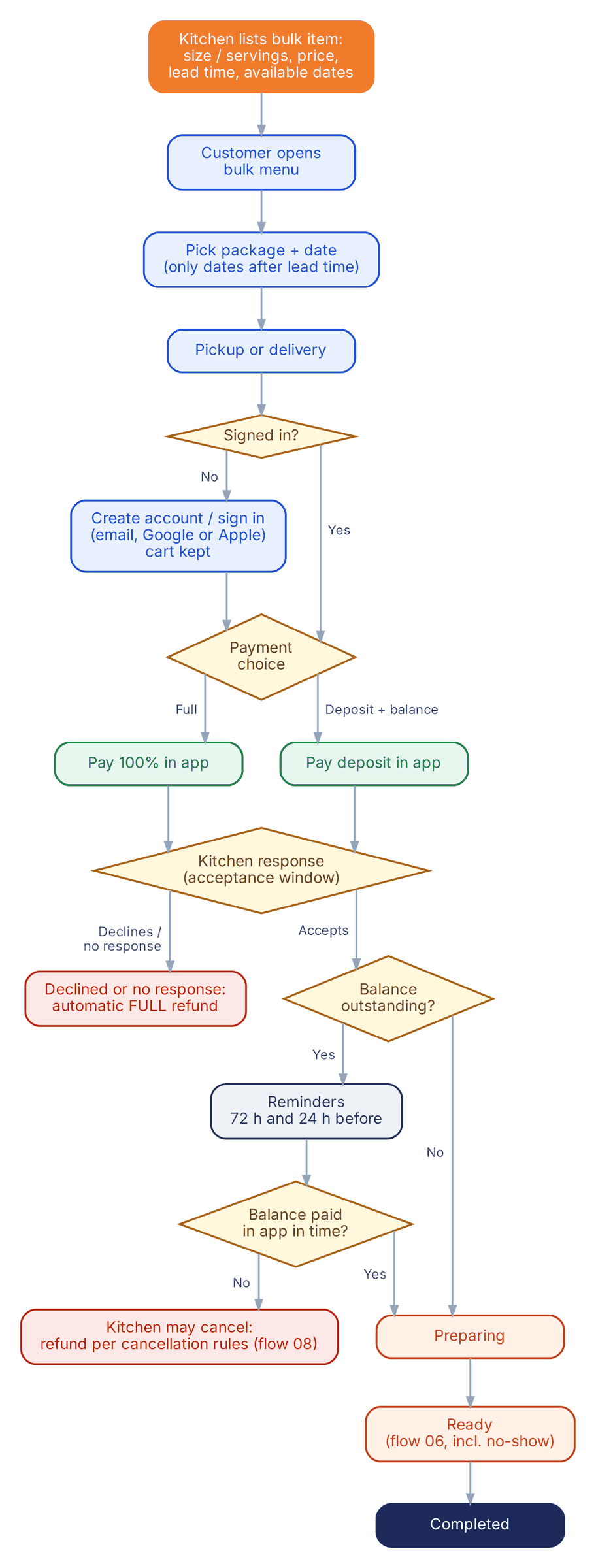
Bulk order flow
Scroll inside the panel to exploreOpen full size ↗

Custom order: request, quote, deposit

Worked through with food for fifty people at a birthday.
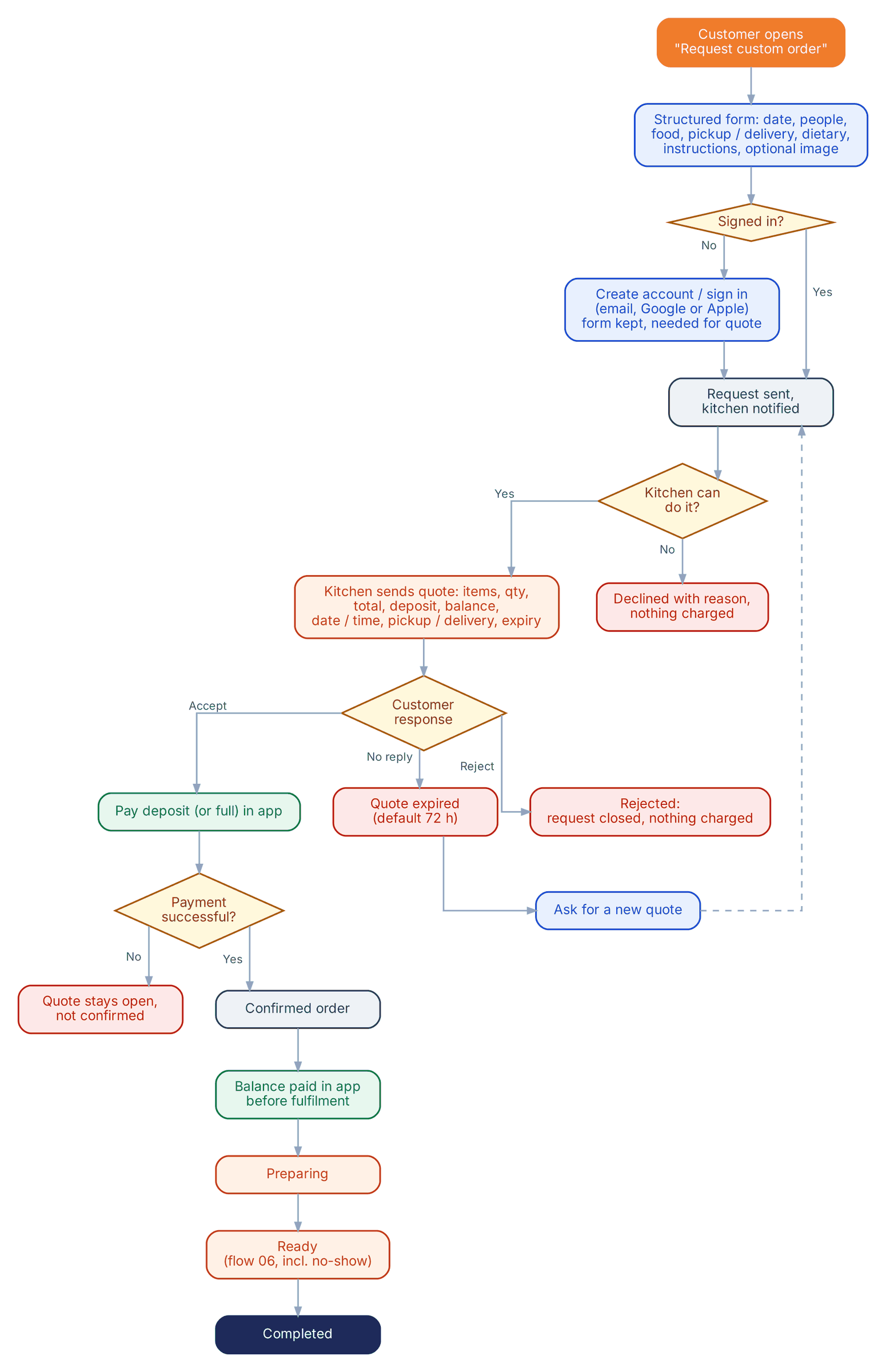
Custom order flow
Scroll inside the panel to exploreOpen full size ↗
Fulfilment 2 flows›

Pickup and kitchen delivery

Includes the customer who does not turn up, and a delivery that cannot be completed.
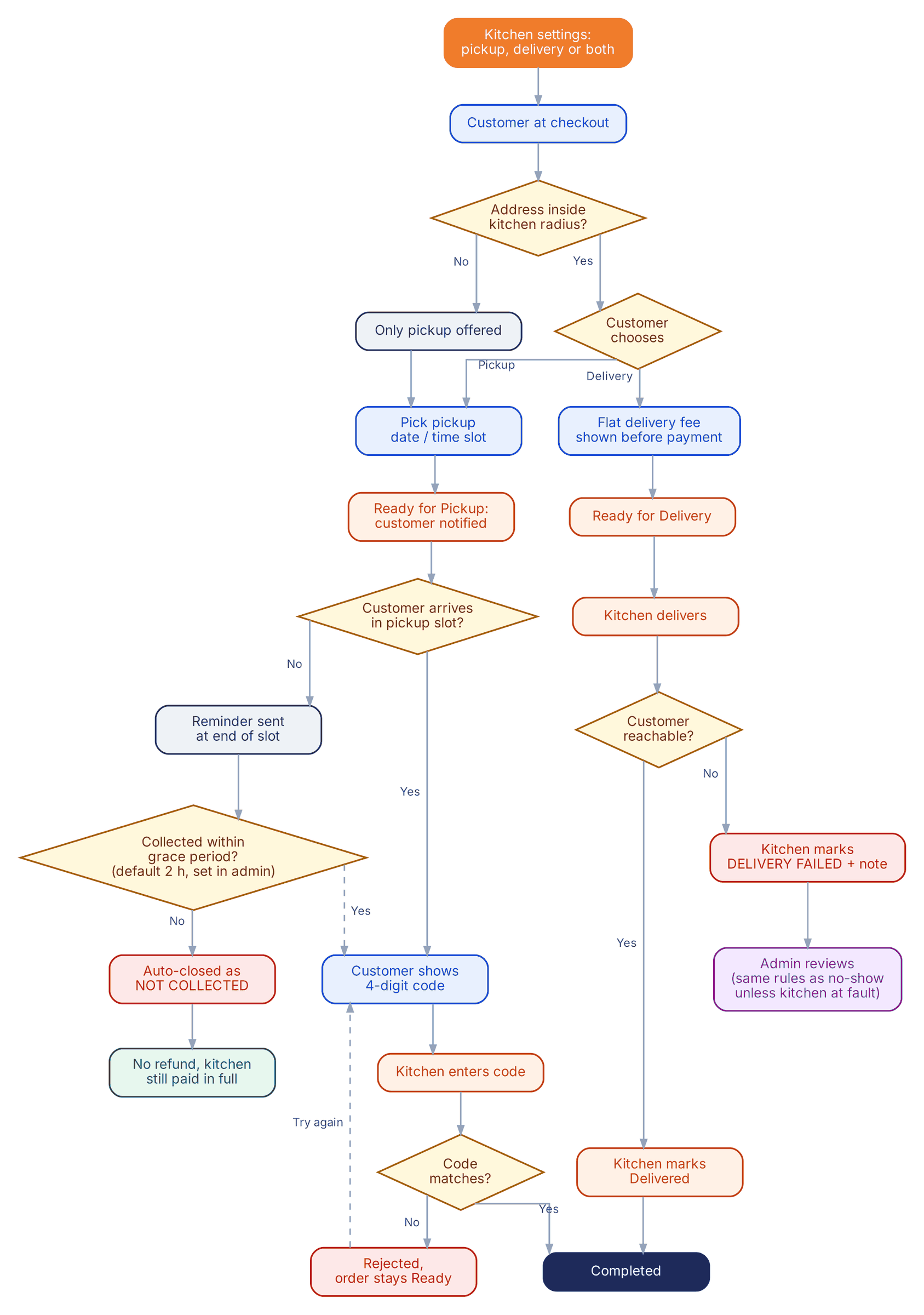
Pickup and delivery flow
Scroll inside the panel to exploreOpen full size ↗

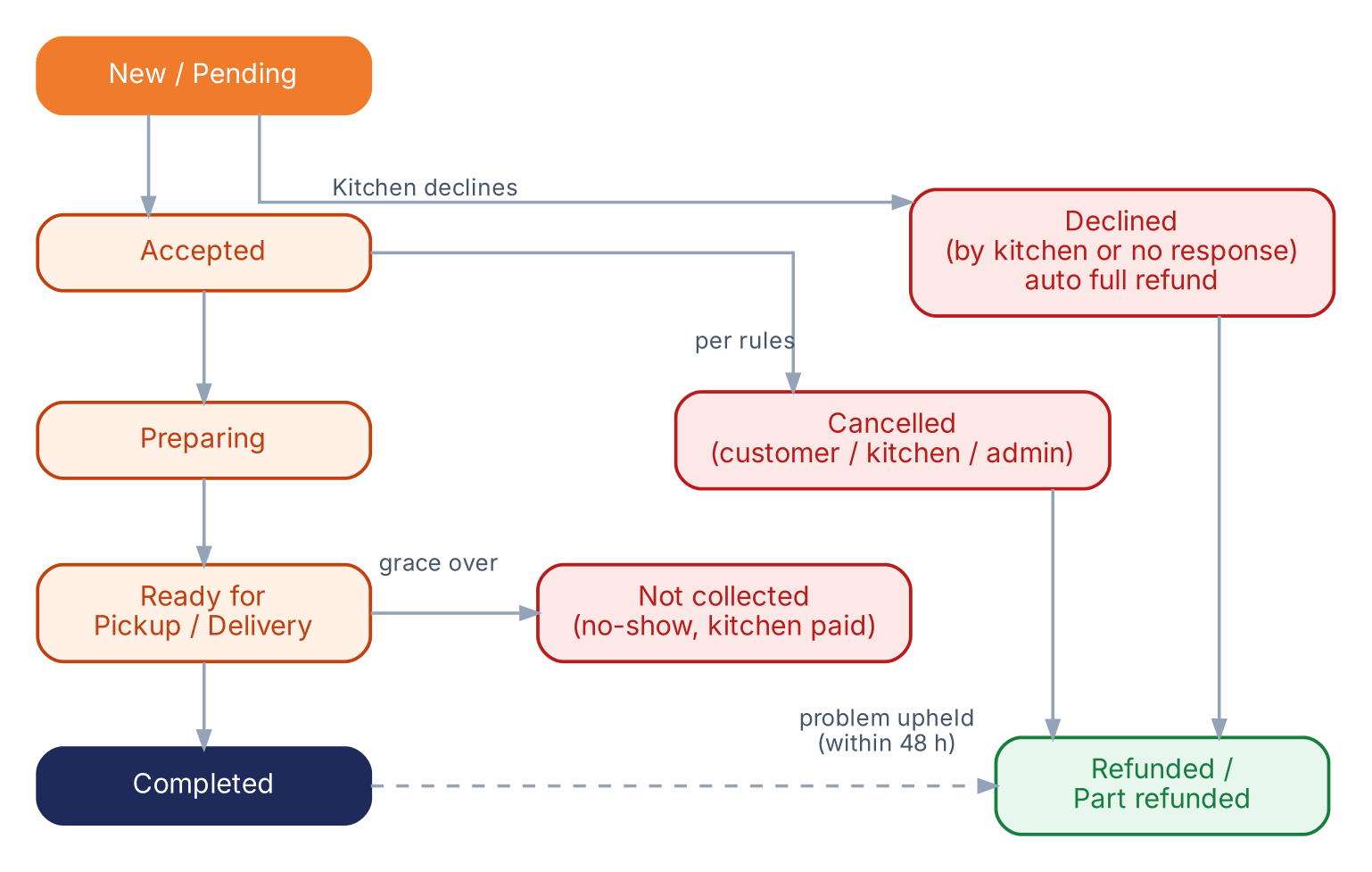
Order status pipeline

The same statuses for regular, bulk and custom orders.
Order status pipeline
Scroll inside the panel to exploreOpen full size ↗
Money 2 flows›

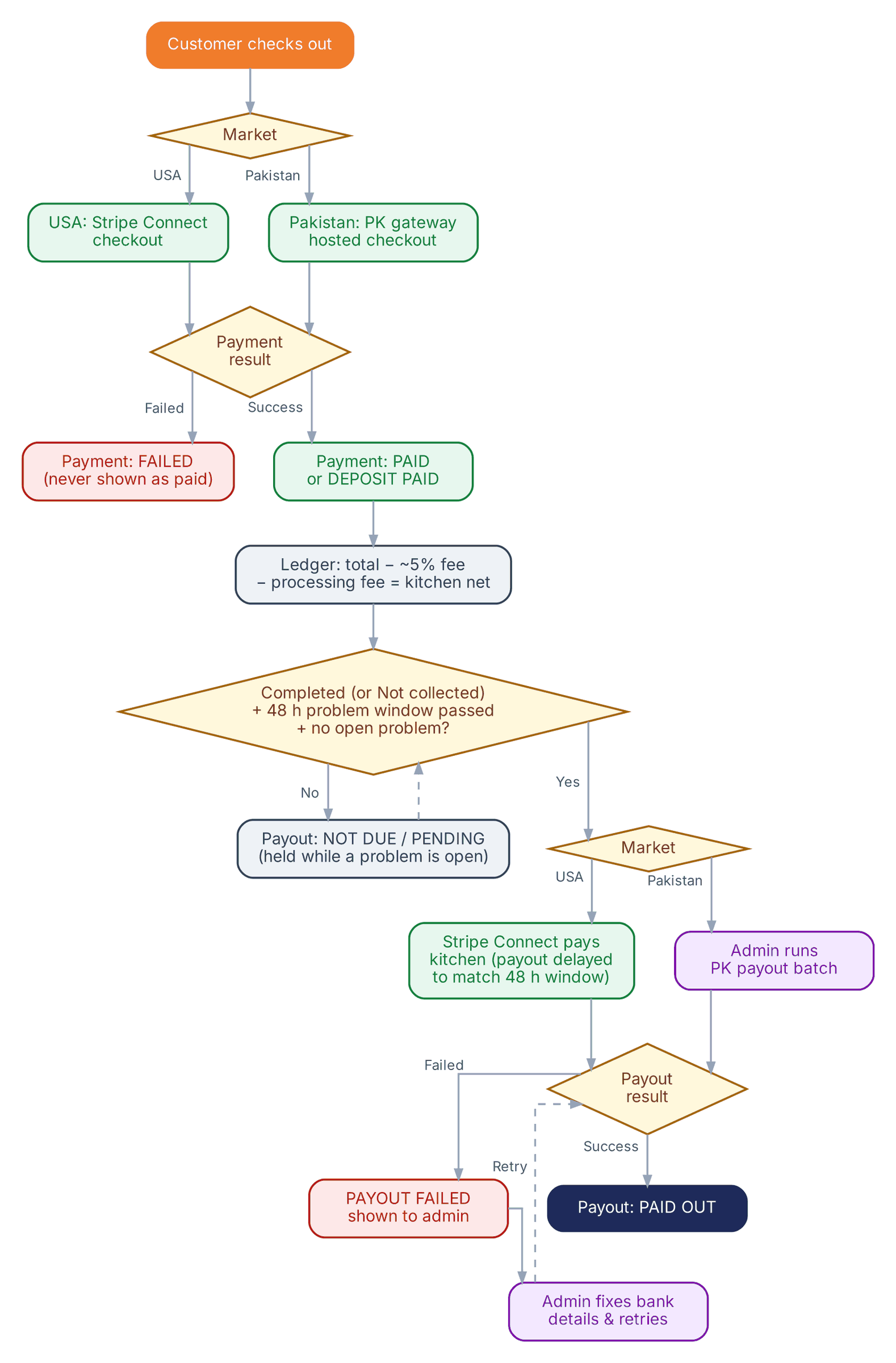
Payment and payout

Customer payment status and kitchen payout status are tracked as two separate things.
Payment and payout flow
Scroll inside the panel to exploreOpen full size ↗

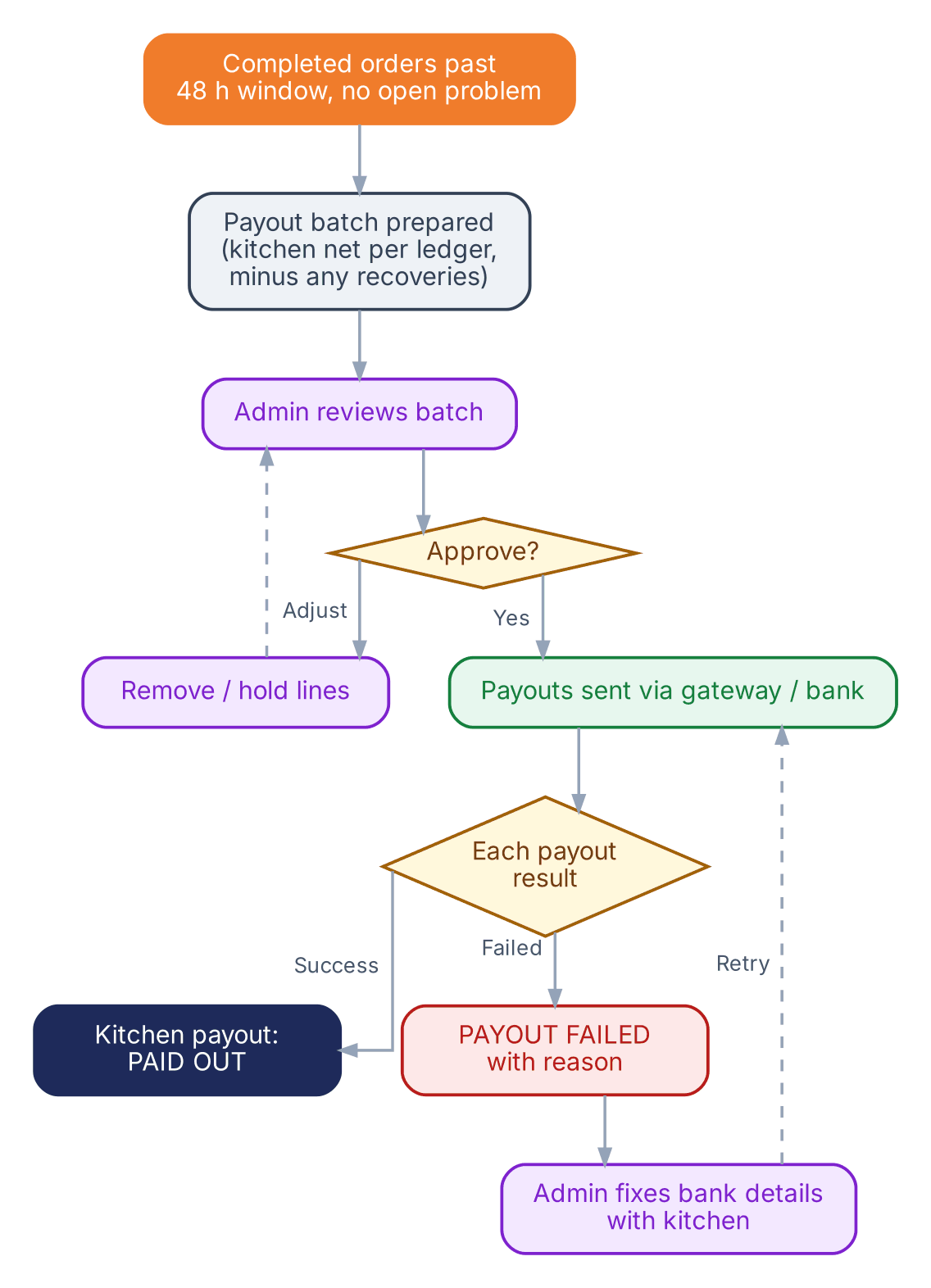
Admin: Pakistan payout run

USA payouts run automatically through Stripe Connect; Pakistan runs as a reviewed batch.
Pakistan payout run flow
Scroll inside the panel to exploreOpen full size ↗
When something goes wrong 3 flows›

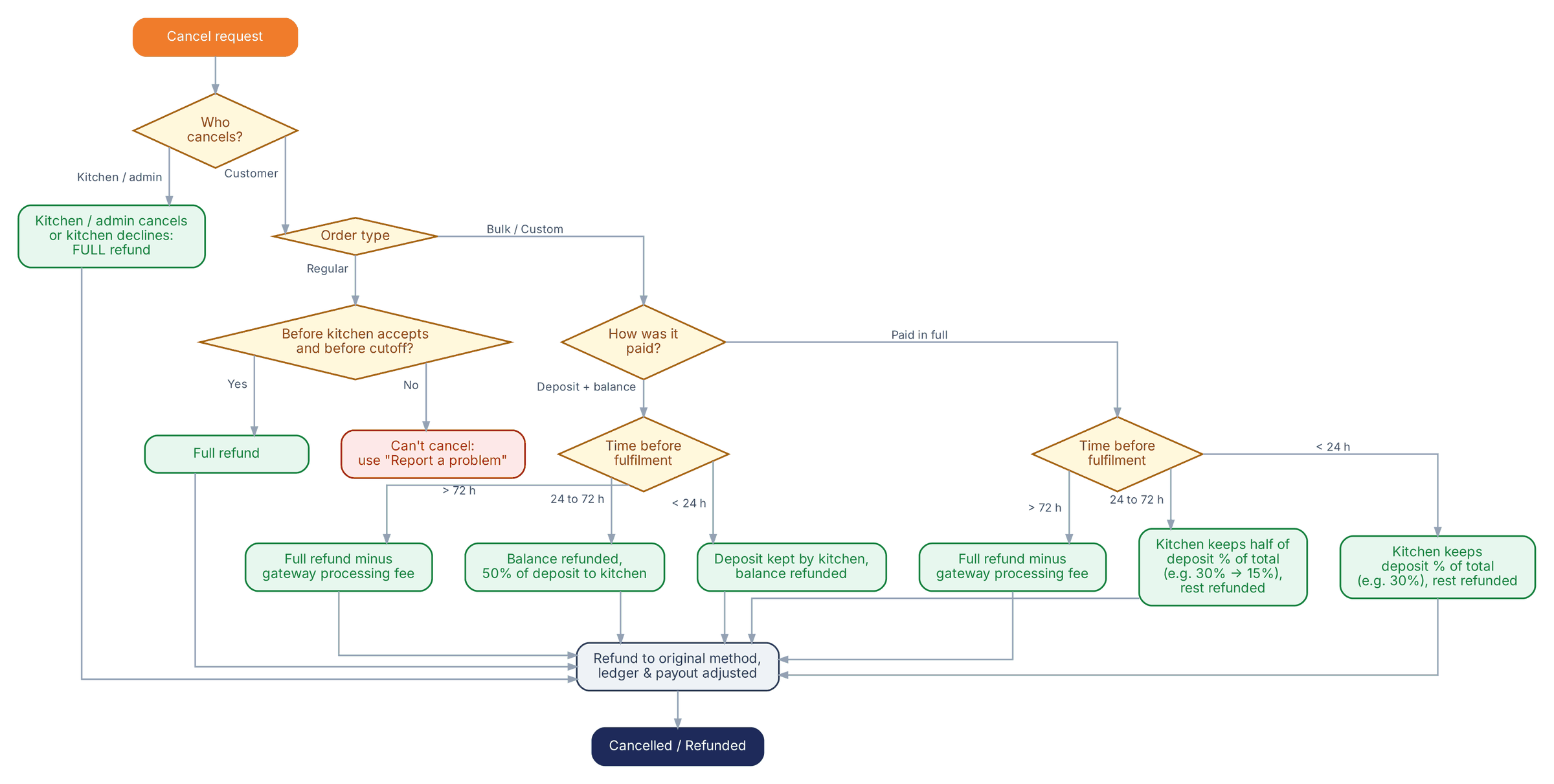
Cancellation and refund

Proposed defaults. Every window and percentage is editable in admin.
Cancellation and refund flow
Scroll inside the panel to exploreOpen full size ↗

Problem with an order

In-app reporting window of 48 hours after completion, set in admin.
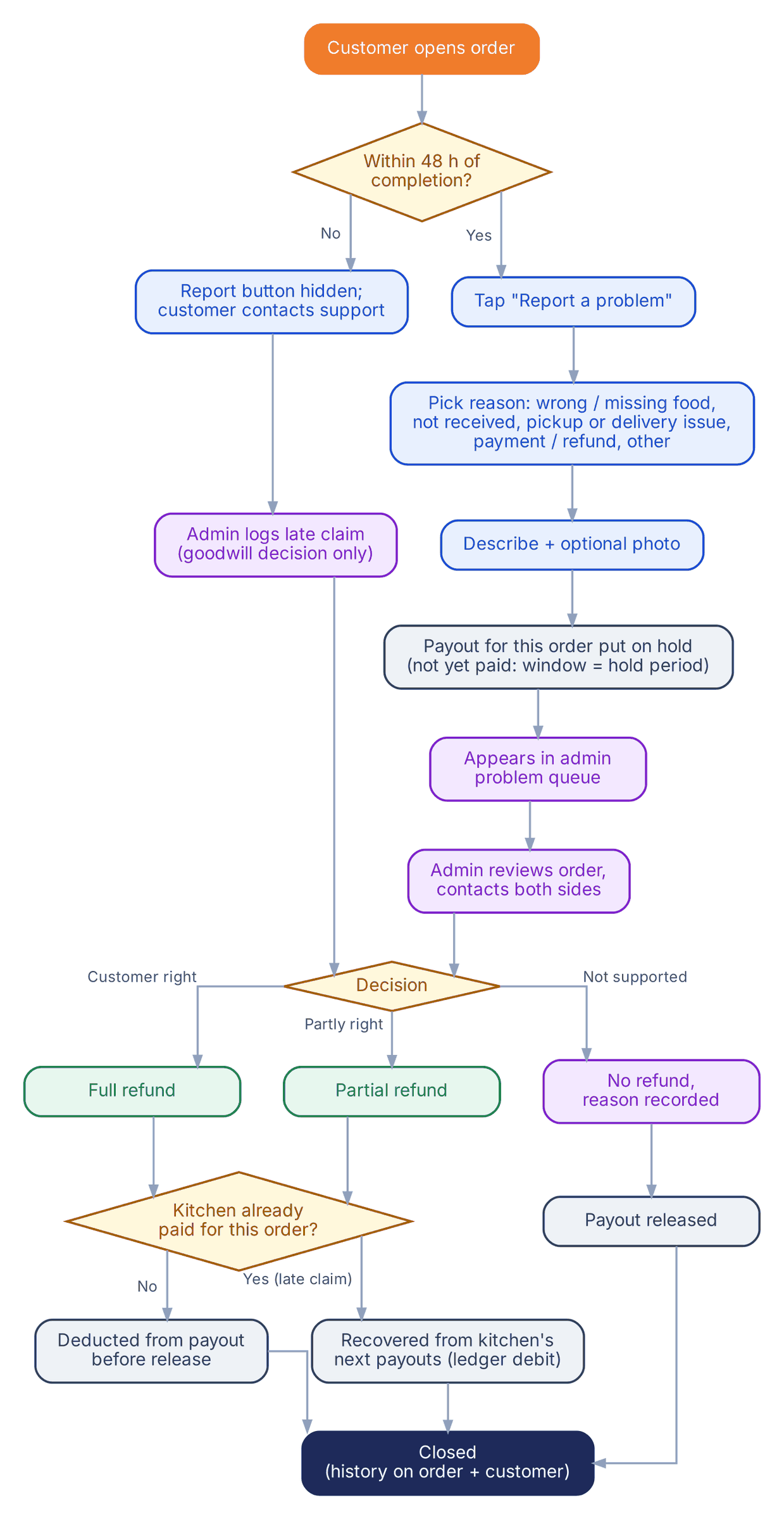
Problem with an order flow
Scroll inside the panel to exploreOpen full size ↗

Admin: payment chargeback

A gateway dispute, kept separate from an ordinary customer complaint.
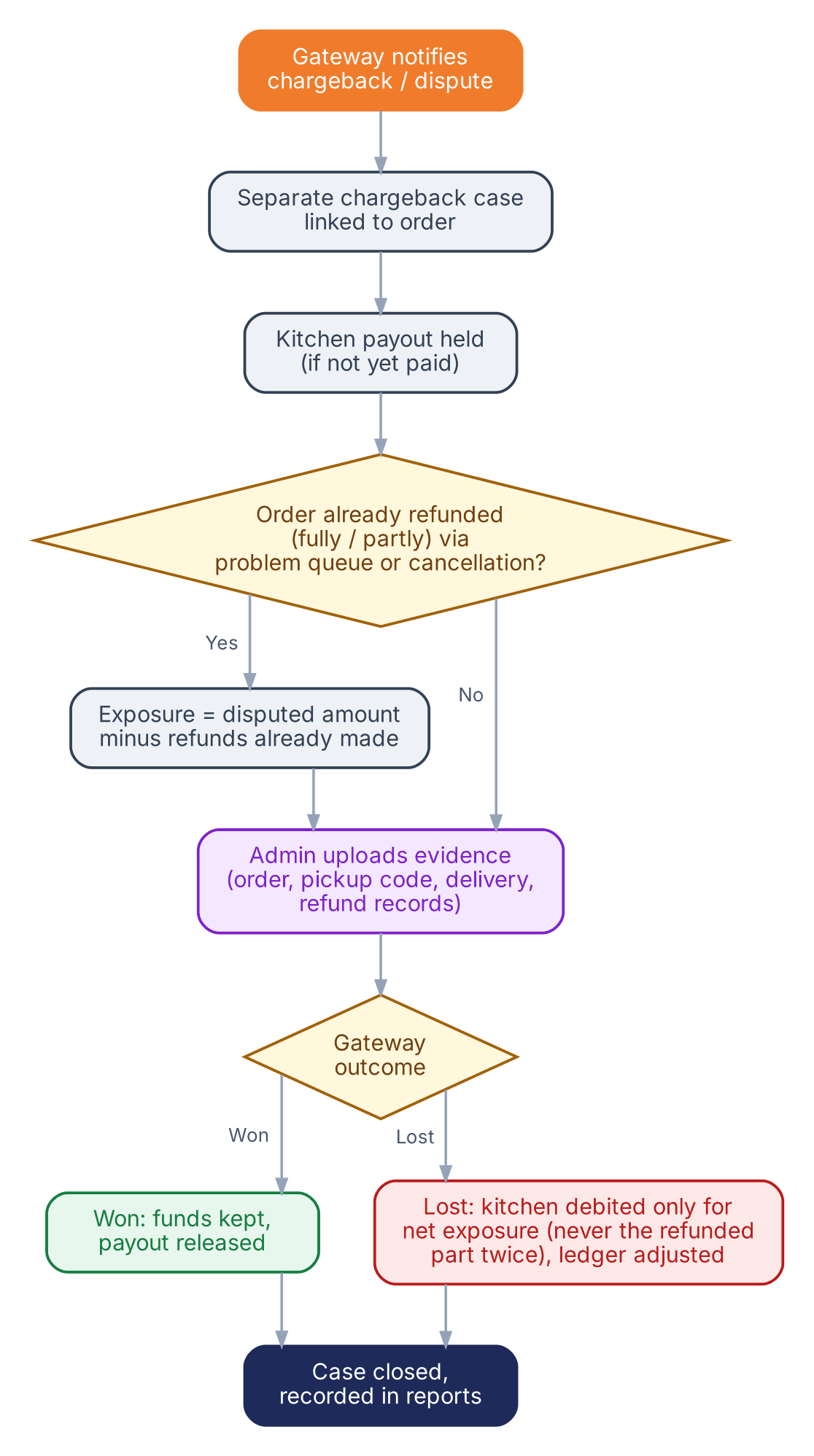
Chargeback flow
Scroll inside the panel to exploreOpen full size ↗
Running the platform 1 flow›

Admin: menu taxonomy management

Cuisine, category, dish, tag and selling option — all added without a developer or a release.
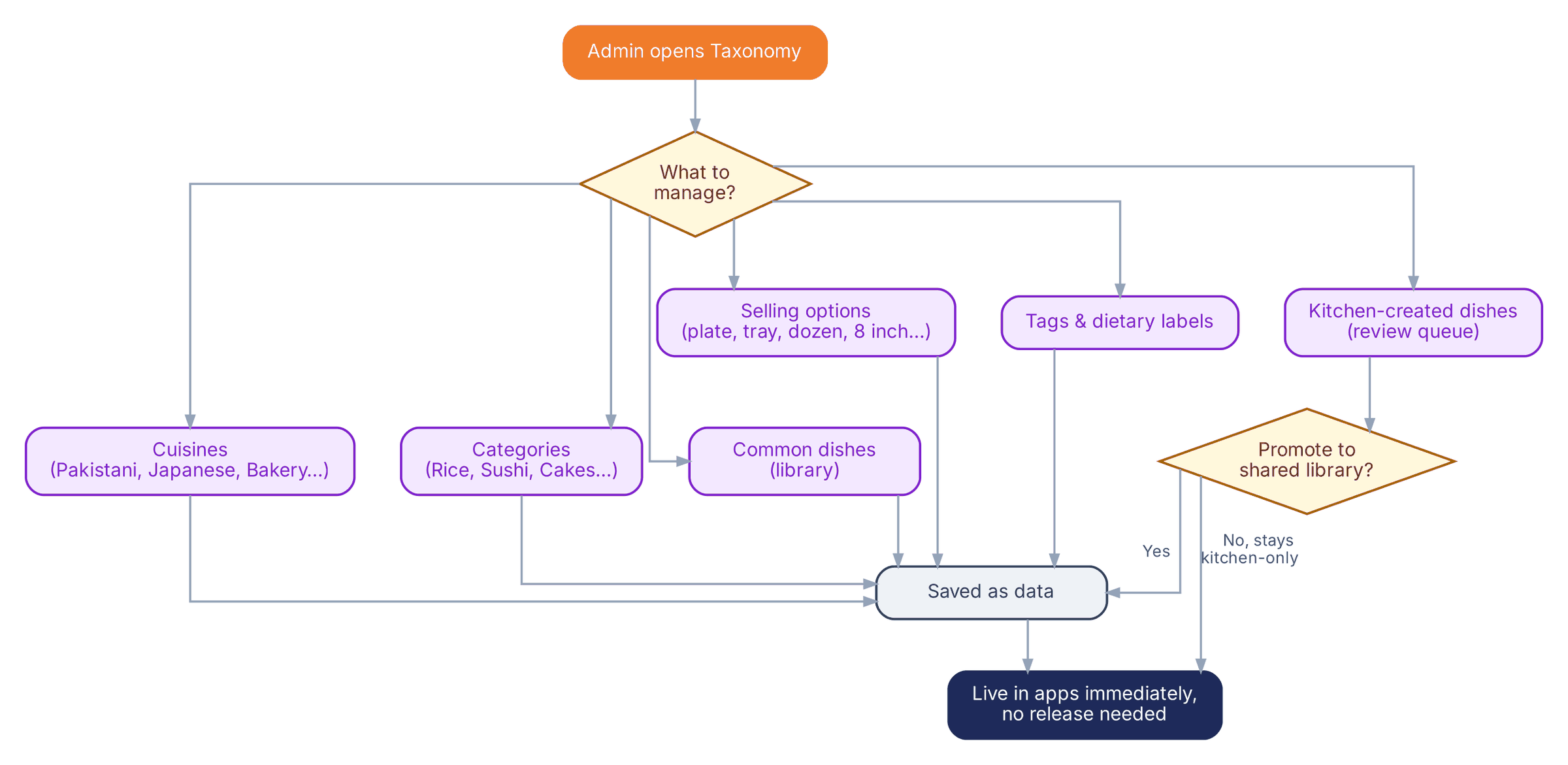
Taxonomy management flow
Scroll inside the panel to exploreOpen full size ↗
05

Requirements

Sixty-nine numbered requirements. The IDs are stable — they are what we quote against, build against and test against, and they carry through to the flows above. New and Updated mark what moved after your last round of feedback.

Kitchen app 23›
IDRequirementChange
KIT-01Account creation and guided onboarding, built to take a kitchen from download to a first published listing in about thirty minutes.—
KIT-02Kitchen profile: name, story, photos, location, cuisines, pickup address, contact details.—
KIT-03Compliance capture at onboarding, configured per market (US state cottage-food fields, local certifications) and managed from admin.—
KIT-04Menu builder on the admin-managed taxonomy (Cuisine → Category → Dish → Selling Option). A kitchen can add a dish that is not in the library.Updated
KIT-05Pre-filled dish libraries per cuisine: toggle a dish on, set a price, edit it — or create a dish, category entry or selling option of your own.Updated
KIT-06AI-assisted listing descriptions, entirely optional. The kitchen can accept, edit or write its own, and the menu works without AI.Updated
KIT-07Flexible selling options per dish: plate, serving, piece, dozen, box, family pack, tray, platter, weight, cake size, number of people.Updated
KIT-08Date-based availability with quantity — Friday, Chicken Biryani, 30 plates. Stock falls as orders are placed, the item shows SOLD OUT at zero, and the kitchen can adjust quantity or close an item at any time. Two customers cannot buy the same last plate.Updated
KIT-09Lead time and order cutoff as two separate settings — 48 hours notice for a cake, Friday orders closing at 2:00 pm.Updated
KIT-10Minimum order value per kitchen and per item.—
KIT-11Three separated order types — regular, bulk and custom — each with its own rules.Updated
KIT-12Custom-order flow: receive a structured request, issue a quote carrying items, quantity, total, deposit, balance, fulfilment date and time, fulfilment method and an expiry. On acceptance the quote becomes an order.Updated
KIT-13Order management across the pipeline: New/Pending → Accepted → Preparing → Ready → Completed, plus Declined, Cancelled and Refunded.Updated
KIT-14Fulfilment settings: pickup, delivery or both. Pickup needs a location and time slots; delivery needs an area and a fee.Updated
KIT-15Earnings view: orders, marketplace and processing fee deductions, payout status and statements.—
KIT-16Subscription management: plan selection, billing status, invoices, free and trial tiers.—
KIT-17Push notifications for new orders, custom requests, payouts and reviews.—
KIT-18View and respond to customer ratings and reviews.—
KIT-19Bulk items published as directly orderable listings — half tray $45, full tray $80, box of twelve cupcakes $30 — with their own servings, price, lead time and available dates. No quote needed.New
KIT-20Simple options and add-ons: choice groups such as mild, medium or hot; priced extras such as extra chicken at $3; and short text fields such as a cake message. Deliberately simple, not a full restaurant modifier system.New
KIT-21Pause and vacation mode: stop taking orders for a date range without deleting the menu or setting it up again on return.New
KIT-22Dietary declarations per item — halal, vegetarian, vegan, gluten-free and allergens — declared by the kitchen. The platform shows the declaration; it does not certify it.New
KIT-23Pickup confirmation: the kitchen enters the customer's four-digit code to complete a collection.New
Customer app 18›
IDRequirementChange
CUS-01Account creation and sign-in, with guest browsing before signup.—
CUS-02Search with partial matching across dish, cuisine, category, kitchen name and tags, so "Biryani" finds "Friday Special Chicken Dum Biryani". Working properly at launch, not deferred.Updated
CUS-03Popular dishes surfaced from order volume and ratings.—
CUS-04Browse and filter by cuisine, pickup or delivery, availability, price, rating and dietary information.Updated
CUS-05Location-aware results: kitchens near enough to collect from, or delivering to the customer's address.—
CUS-06Kitchen profile: story, photos, daily and bulk menus with live availability and SOLD OUT state, prices, dietary information and reviews.Updated
CUS-07Cart and checkout, one kitchen per order. Several items from one kitchen check out together; another kitchen is a separate order.Updated
CUS-08Bulk ordering: published bulk items ordered directly against the kitchen's lead time and available dates.Updated
CUS-09Custom orders through a structured request form — date, number of people, food, fulfilment method, dietary needs, instructions — with an optional image.Updated
CUS-10Pickup or delivery chosen at checkout where the kitchen offers it, with fees shown before payment.—
CUS-11Regular orders paid fully online. Bulk and custom paid in full or as deposit plus balance, with the balance also paid in the app before fulfilment. No cash at pickup.Updated
CUS-12Order status tracking through the pipeline with the scheduled date and time. Status only — no live GPS in this build.Updated
CUS-13Order history and quick reorder.—
CUS-14Ratings and reviews after a completed order.—
CUS-15Push notifications: order confirmed, quote received, order ready, and similar.—
CUS-16Saved kitchens: save one, see the list, remove it. No saved dishes or new-item alerts in this build.Updated
CUS-17Report a problem with an order: pick a reason — wrong or missing food, not received, pickup or delivery issue, payment or refund, other — describe it, and attach a photo if useful.New
CUS-18A four-digit pickup code shown to the customer and given to the kitchen on collection.New
Admin panel 13›
IDRequirementChange
ADM-01Secure web admin panel with role-based access.—
ADM-02Kitchen applications: review, approve, suspend, remove.—
ADM-03Customer management: basic details, order history, support and dispute history, and the ability to suspend an account.Updated
ADM-04Subscription plans: create and edit tiers, price per market and currency, free first month or free until first order. No per-tier feature gating.Updated
ADM-05Marketplace fee configuration, percentage-based, adjustable globally or per kitchen.—
ADM-06Payments oversight that separates an ordinary customer complaint from a formal gateway chargeback. Covers transactions, processing fees and refunds.Updated
ADM-07Payout management, including the reviewed batch workflow for Pakistan.—
ADM-08Taxonomy management: create and edit cuisines, categories, common dishes, tags and selling options without a developer or an app release.Updated
ADM-09Order oversight with full detail: customer, kitchen, items, order type, amount, scheduled date and time, fulfilment method, order status, payment status, and any refund or dispute.Updated
ADM-10Content moderation for listings, photos and reviews.—
ADM-11Compliance field configuration per market.—
ADM-12Reporting: kitchens, orders, GMV, subscription revenue, marketplace fees, refunds, payouts, and the split between regular, bulk and custom business. No BI or forecasting in this build.Updated
ADM-13Problem queue: view, respond to and resolve reported order problems, with the history attached to both the order and the customer.New
Payments 10›

The two markets work differently. In the USA the gateway splits the payment and pays the kitchen automatically. In Pakistan local gateways cannot split, so the platform collects centrally and payouts run as a reviewed batch from admin. Both sit behind one payments layer, so orders, ledgers, refunds and reports behave identically either way.

IDRequirementChange
PAY-01USA: a gateway with split payments and managed payouts (Stripe Connect or equivalent) handling subscription billing, automatic marketplace-fee deduction and kitchen payouts.—
PAY-02Pakistan: local gateway integration with central collection and admin-run payouts. Customer payment status and kitchen payout status are tracked separately — a customer can read PAID while the kitchen reads PAYOUT PENDING.Updated
PAY-03One payments layer across both markets so orders, ledgers and fees behave identically.—
PAY-04Payment timing by order type: regular paid fully at checkout; bulk and custom paid in full or as deposit plus balance, with the balance collected in the app before fulfilment.Updated
PAY-05Refunds and cancellations per order type, including deposit rules for bulk and custom work.—
PAY-06Multi-currency: PKR and USD pricing, checkout and reporting.—
PAY-07Subscription billing with trial and free tiers per market, configurable from admin.—
PAY-08Per-kitchen ledger: earnings, marketplace fees, processing fees and payout statements.—
PAY-09Tax handling per market. Rates are set per market in admin and recorded in the ledger; filing and remittance remain yours.—
PAY-10Failure handling: a failed customer payment never shows as paid, and a failed kitchen payout surfaces to admin as its own state.New
Option A — platform delivery 5›

Priced separately and excluded from the first launch.

IDRequirementPhase
DRV-01Driver app for iOS and Android: onboarding and documents, availability, job acceptance, navigation, proof of delivery.Option A
DRV-02Dispatch and assignment: matching orders to drivers per market and zone.Option A
DRV-03Live GPS tracking for customers.Option A
DRV-04Third-party fleet integration — an Uber Direct-type API in the USA, a local rider service in Pakistan.Option A
DRV-05Delivery pricing engine, driver earnings and driver payouts.Option A
06

How it will be built

Technology

LayerChoiceWhy, for this product
Customer & kitchen appsReact Native (TypeScript)One codebase for iOS and Android across both apps. Shared components keep the two apps consistent.
Admin panelReact (Next.js)Fast for table-heavy screens, reports and configuration forms, and shares types with the API.
BackendNode.js (NestJS), REST API with OpenAPI docsModular structure maps onto orders, payments and fulfilment. Mature Stripe and webhook support, documented API-first.
DatabasePostgreSQLReal transactions and row locking for stock counts and the money ledger — the two highest-risk parts of this build.
SearchPostgreSQL full-text plus trigram matching at launch; Meilisearch at scalePartial matching from day one with no extra service to run, and a clean path to move later.
Cache & jobsRedis with a job queueStock holds, quote expiry, balance reminders, payout batches, image processing.
HostingAWS in your account, S3 and CloudFront for imagesYou own everything, and an image CDN keeps photo-heavy menus quick on mid-range phones.
PaymentsStripe Connect (USA); Safepay or PayFast (Pakistan)Split payouts in the USA; central collection with hosted checkout and webhooks in Pakistan.

Architecture principles

Two things worth spelling out

Nobody oversells the last plate

Each item has an availability row per date carrying the quantity left. At checkout the stock is reserved in a single database statement that only succeeds if enough remains, so when two customers reach for the last plate at the same moment only one wins — the other is told it just sold out, before paying.

The reservation is held for ten minutes while payment completes. On success it becomes a confirmed sale; on failure or timeout the stock is released automatically. At zero the item shows SOLD OUT everywhere.

Search that works on day one

PostgreSQL full-text search with trigram matching across dish, cuisine, category, kitchen name and tags, including tolerance for typos. Results are filtered by location, availability, fulfilment method, price, rating and dietary information, then ranked by relevance and popularity.

Moving to a dedicated search service later is a change behind the search module only. The apps do not change.

Scaling

StageSetupWhat changes
Launch
~100 kitchens, both markets
One AWS region, two API containers, managed PostgreSQL with daily backups, Redis, CloudFront CDN.Images resized at upload. All times stored in UTC and shown in each market's own time zone.
Growth
~1,000 kitchens
Auto-scaling API, a PostgreSQL read replica, background workers split out.Reports run against the replica. Heavier caching of menus and search.
Scale
10,000+ kitchens
Dedicated search service, larger database, optionally a second region near Pakistan.Search moves off the main database. Data partitioned by market if needed.

Both markets are served from one primary region with edge caching for images and menus. Screens are designed to load in one or two API calls so latency from Pakistan stays comfortable; a Pakistan-side read replica is the next step if it is ever needed.

07

What you receive

Code and ownership

  • On payment as agreed, you own all project-specific source code and intellectual property, with full repository access and the build and deployment information needed to run and continue the project.
  • No lock-in components.
  • Hosting, payment gateways, the AI API and the Apple and Google developer accounts are all opened in your name.

Documentation and quality

  • Architecture overview, API documentation, deployment runbook and environment setup.
  • Test plan, test cycles and support through your acceptance testing.
  • Daily automated database backups with point-in-time recovery and 30-day retention. A restore is tested before launch and written into the runbook.
  • A separate staging environment. Every change is tested there before going live.

Design

Warranty

Thirty days from go-live. Because this is a payments build, the warranty starts only once real payments, refunds and payouts have run in production. Every defect against an agreed requirement found in that window is fixed at no cost. After that, support continues under the retainer and hourly rate below.

08

Timeline

Twelve to fourteen weeks from kickoff to store submission.

WeeksStage
1Kickoff, flow walkthrough and sign-off
1–3Wireframes and UI design
2–6Backend foundation, taxonomy, admin core
4–9Kitchen app
5–10Customer app
6–11Payments for both markets, ledger and payouts
9–12QA cycles and your acceptance testing
12–13Store submission and production deploy
13–14Store review buffer
09

Investment

⚠ Internal draft — not client pricing

The figures in this section are the build-cost basis only. They are not IT Walay's price to the client and must be replaced before this page is shared. Everything else on this page is client-ready.

Summary

LinePrice / term
A. Core MVP — customer app, kitchen app, admin panel, dual-market payments$6,000
B. Option A — platform delivery module, quoted separately$3,000
C. UI/UX design — all three applications$800
Timeline12–14 weeks
Warranty30 days from go-live
Management retainer after warranty$750 / month
Out-of-scope and development hours$10 / hour

A. Core MVP by module

Core modules are the minimum working marketplace. Optional modules are in the agreed scope and included in the total, but each can be removed to bring the price down.

ModuleCoversPrice
C1 · Platform foundation
API, auth and roles, market config, staging, backups, monitoring
Architecture$700
C2 · Kitchen onboarding and profile
Guided onboarding, profile, compliance fields, minimum order
KIT-01, 02, 03, 10$400
C3 · Menu engine and taxonomy
Cuisine → Category → Dish → Selling Option as admin data, dish libraries, flexible units
KIT-04, 05, 07, ADM-08$600
C4 · Regular orders and stock
Date quantity, SOLD OUT, no overselling, lead time and cutoff, one-kitchen cart, checkout
KIT-08, 09, 11, CUS-06, 07, 10$700
C5 · Order pipeline and fulfilment
Status pipeline, pickup code, kitchen delivery with flat fee in radius, notifications
KIT-13, 14, 17, 23, CUS-12, 15, 18$450
C6 · Payments core
Payments layer, ledger, refunds, failure states, payouts, subscriptions with web billing, tax
PAY-01/02, 03, 05, 07–10, KIT-15, 16, ADM-07$750
C7 · Admin core
Kitchens, customers, orders, fees, plans, moderation, compliance config, reporting
ADM-01 to 06, 09 to 12$450
C8 · Discovery and search
Guest browsing, partial-match search, popular dishes, location results
CUS-01, 02, 03, 05$300
Core subtotal$4,350

Optional modules — included, removable

ModuleIf removedPrice
R1 · Second market live at launch
Both Pakistan and USA payments from day one, PKR and USD
Launch one market first, add the second later$450
R2 · Bulk menu
Directly orderable trays and packages with lead time
Kitchens list trays as regular items$150
R3 · Custom orders
Structured request, kitchen quote, deposit and in-app balance
Custom requests handled outside the app at first$350
R4 · Options and add-ons
Spice level, priced extras, cake message
One price per selling option, notes field only$150
R5 · Problem reporting queue
Customer report with photo, admin resolution queue
Problems handled by email or WhatsApp support$150
R6 · Filters and dietary info
Cuisine, price, rating, availability filters; halal, vegetarian, allergens
Search only, no filter panel$100
R7 · AI listing descriptions
Optional AI-written descriptions, fully editable
Kitchens write their own descriptions$100
R8 · Ratings and reviews
Review after completion, kitchen replies
Popular dishes ranked by order volume only$100
R9 · Saved kitchens, pause, reorder
Save and remove kitchens, vacation mode, quick reorder
Kitchens hide items manually when away$100
Optional subtotal$1,650
Core MVP total$6,000

Dependencies. Bulk without custom (R2 without R3) is paid in full only, with no deposit option. Removing reviews (R8) means popular dishes are ranked by order volume alone. Any removed module can be added later at the same price.

B. Option A — platform delivery

ModuleCoversPrice
A1 · Driver app (iOS + Android)
Onboarding, documents, availability, jobs, navigation, proof of delivery
DRV-01$1,200
A2 · Dispatch and assignment
Order-to-driver matching per market and zone
DRV-02$600
A3 · Live GPS tracking
Customer sees the driver live on a map
DRV-03$500
A4 · Third-party fleet integration
Uber Direct-type API (USA), local rider service (Pakistan)
DRV-04$400
A5 · Delivery pricing and driver payouts
Pricing engine, driver earnings, payouts
DRV-05$300
Option A total$3,000

A1 and A2 are the minimum for running your own fleet. A4 on its own is enough for third-party delivery.

Payment schedule

MilestoneWhen%
Contract signed, kickoffWeek 130%
Flows and UI design signed offWeek 315%
Core build demo — menu, stock, orders, adminWeek 825%
Payments live, full apps in testingWeek 1120%
Acceptance sign-off and store submissionWeek 13–1410%

Option A, if commissioned, is billed 40% at start, 40% at demo and 20% on sign-off.

Zone-based delivery pricing

You asked whether varying the delivery fee by distance or zone costs meaningfully more than a flat fee within a radius. It does: roughly $200 and about a week, mostly for the kitchen settings screen, the checkout calculation and the edge cases where an address sits on a boundary. This quote includes the flat fee, and the data model stores the fee structure so zones can be added later without changing checkout.

10

Running costs

What it costs to operate the platform once it is built. These are paid by you directly, with every account opened in your name.

ServiceUsed forAt launch~1,000 kitchens
AWS hosting (production)API servers, PostgreSQL, Redis$90–140$300–500
AWS hosting (staging)Testing changes before they go live$30–50$50–80
Storage and CDNMenu photos, fast image delivery$10–30$60–150
BackupsDaily automated backups, 30-day retention$5–15$20–40
MapsLocation results, pickup address, radius$0–50$100–300
EmailReceipts, quotes, notifications$1–10$10–30
Push notificationsOrder and quote alertsFreeFree
AI APIOptional listing descriptions$1–5$10–30
Crash and error monitoringBugs and crashes from day one$0–26$26–80
Product analyticsUsage funnelsFree tier$0–100
Apple and Google developer accountsStore publishing$99/yr + $25Same
Estimated monthly total~$150–330~$600–1,300

Payment processing is charged per transaction by the gateway rather than monthly. Stripe in the USA is around 2.9% plus 30¢ with Connect payout fees on top; Pakistani gateway rates are negotiated when you onboard as a merchant. Both are tracked in the ledger as processing fees. Exact rates are confirmed with each provider.

11

After launch

ItemWhat it coversCost
Warranty30 days from go-live. Any defect against an agreed requirement is fixed free.Included
Management retainerAccount manager, server and uptime monitoring, backup checks, security and dependency updates, store compliance updates, issue triage, monthly report.$750/mo
Development hoursNew features, changes and fixes outside warranty.$10/hr

The team needed to run it

RoleWhoTimeCost
Account manager and DevOpsIT Walay (in retainer)Part-time$750/mo
Developers for fixes and small featuresIT Walay60–80 hrs/mo for months 1–3, then 30–50$300–800/mo
Operations and adminYour sideKitchen approvals, Pakistan payouts, problem queueYour own hire

Expect roughly $1,350–1,550 a month from us in the first three months after warranty, settling to about $1,050–1,250. The operations person is the one role that has to sit on your side, because approving kitchens and releasing payouts are your decisions to make.

12

Assumptions and change control

What we have assumed

Requirement or new feature

If something is part of an agreed requirement, making it work properly is included. If a kitchen has thirty meals and the quantity has to fall with each order until it reads SOLD OUT, then all the logic and edge cases behind that sit inside KIT-08 at no extra cost.

A new feature is something not in the signed-off requirements and flows — a driver network, a multi-kitchen cart, full chat. Those are estimated in hours and approved before any work starts. Writing this document in the detail we have is what keeps that line clear for both of us.

13

Decisions we need from you

Each of these has a working assumption already built in, so nothing is blocked. But they are your calls, and the walkthrough is the right moment to make them. Everything below is configurable afterwards.

01How long should a custom quote stay open?

Our assumption: 72 hours by default, with the kitchen able to set anywhere from 24 hours to 7 days on an individual quote.

02What deposit should bulk and custom orders take?

Our assumption: 30% as the platform default, with kitchens free to choose between 20% and 50% inside limits you set in admin.

03What are the cancellation rules?

Our assumption: regular orders can be cancelled until the kitchen accepts or until cutoff, whichever comes first, with a full refund. Bulk and custom follow a sliding scale — full refund minus the processing fee beyond 72 hours, half the deposit kept between 24 and 72 hours, the deposit kept inside 24 hours. A kitchen cancelling always means a full refund. All windows and percentages are editable.

04Who can issue a refund?

Our assumption: a kitchen can refund its own orders up until payout. Admin can refund any order at any time. Formal gateway disputes are admin-only.

05How are kitchen subscriptions billed?

Our assumption: sign-up and billing happen on a web page rather than through in-app purchase, with the app showing plan status and linking out according to each store's current rules. Billing subscriptions inside the app would hand Apple a share of every one, which does not work with a low-fee marketplace. No extra cost either way.

06Anything missing?

If something you expect at launch is not written down above, now is the moment. Anything added after sign-off is scoped and priced separately, which is better for both of us than discovering it in week nine.

14

Next steps

  1. Read this through and mark anything wrong. The requirement IDs make that easy — point at KIT-08 or CUS-11 and we will know exactly what you mean.
  2. We walk the flows together. One session covering the customer, kitchen and admin sides, the three order types, payment, fulfilment, cancellation and refund, and what happens when an order goes wrong. The six decisions above get settled in the same conversation.
  3. Scope is locked and the quote is confirmed. Core MVP and the delivery module priced separately, with running costs itemised.
  4. Design, then development. Wireframes and UI first, built on confirmed scope rather than assumptions, then the build.